
Reference
Grading guide & photo tips
Understand what PSA, CGC, and Beckett evaluate - and how to photograph your cards for the best AI grade estimate.
The rubric
How the grade scale works
The four things the model scores before it lands on the final number, shown on real cards graded here.
Centering
The model checks how evenly the printed borders sit left-to-right and top-to-bottom on the card face and back.

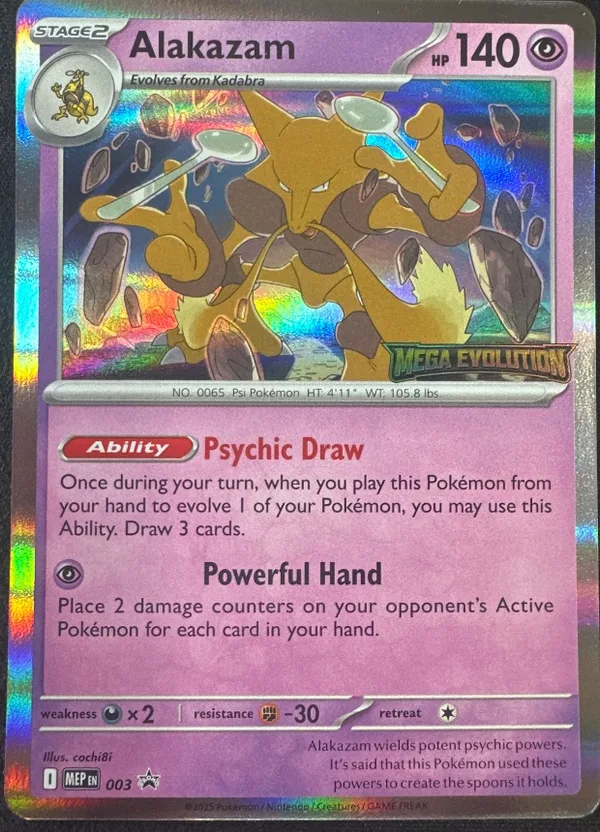
Even great-looking cards fall out of gem-mint territory when the border balance is visibly off. Centering is often the first fast rejection signal for modern submissions.
- 10
- Looks very even at a glance.
- 9
- Minor imbalance, still strong.
- 8
- Clearly off-center but acceptable.
- 7
- Obvious shift affects eye appeal.
- 6-
- Heavy imbalance or tilt.
Corners
The model looks for whitening, soft tips, fraying, bends, and other visible damage at each corner.
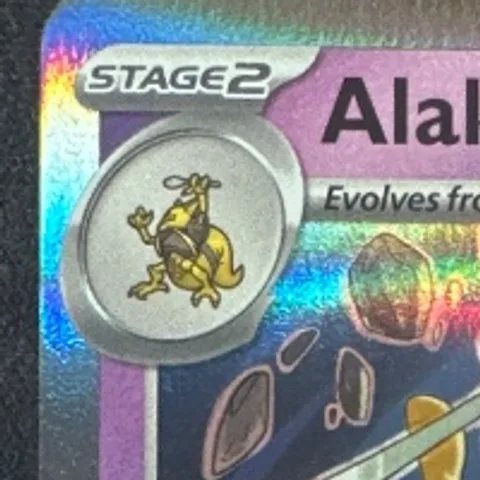
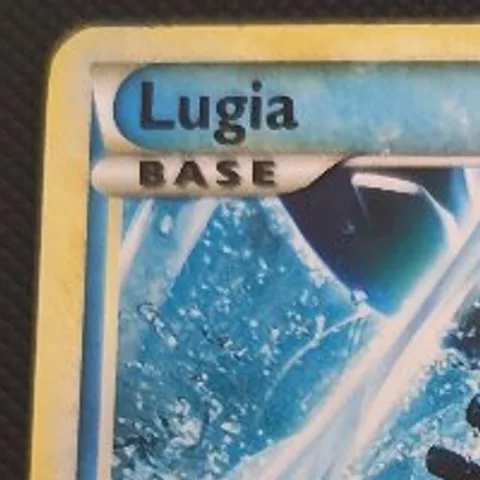
Corners are brutal on both vintage and modern cards. A tiny soft corner can be the whole difference between a strong submission and an expensive mistake.
- 10
- Sharp with no visible wear.
- 9
- Tiny touch of wear only.
- 8
- Light whitening or softness.
- 7
- Noticeable wear on one or more corners.
- 6-
- Blunting, bends, or heavy whitening.
Edges
The model checks perimeter wear, chipping, silvering, whitening, and rough cuts around the card border.
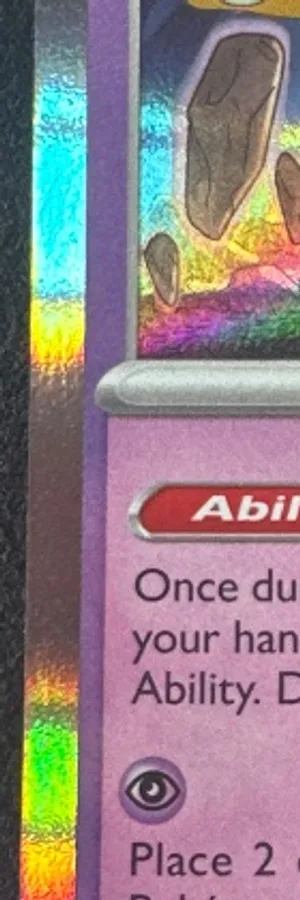

Edges expose handling damage fast. Different games print differently, but edge wear still kills top-end grades across the board.
- 10
- Clean edge line throughout.
- 9
- Very light edge wear.
- 8
- Several small worn spots.
- 7
- Visible whitening or roughness.
- 6-
- Heavy chipping or broad wear.
Surface
The model looks for print lines, scratches, dents, stains, indentations, and gloss disruptions on the card front and back.
Surface flaws are easy to miss in bad lighting and expensive to discover after submission. Holo cards especially get punished here.
- 10
- Clean surface with strong gloss.
- 9
- Tiny print issue or faint mark.
- 8
- Light scratching or print lines.
- 7
- Visible defects affecting presentation.
- 6-
- Dents, major scratches, or heavy wear.
Understand the scale
Where grades fall on the spectrum
Professional grading uses a 1–10 scale with half-point increments. Understanding where each band sits helps you interpret your pre-screen results and set realistic expectations.
Decision framework
Should you submit this card?
Not every card belongs in a grading queue. This flowchart walks through the practical decision points that separate strong submission candidates from cards that should stay raw.
Submit
High pre-screen score + meaningful value spread between raw and graded.
Borderline
Good card but flaws or thin margins make the decision tighter.
Skip
Low condition score, thin spread, or no clear reason to grade.
Get better results
Photo tips for accurate grading
Use natural or diffused light
Avoid direct flash — it creates glare, especially on holofoil cards. Soft, even lighting from the side works best.
Shoot straight down
Hold the camera directly above the card, parallel to the surface. Any angle distorts the borders and throws off centering analysis.
Dark, matte background
A dark surface with no pattern gives the AI clean edges to analyze. Avoid wood grain, fabric textures, or patterned surfaces.
Fill the frame
The card should take up 70–80% of the image. Too far away and the AI can’t see corner and edge detail.
Remove from sleeve
Sleeves and toploaders cause reflections and glare that reduce grading accuracy. Take the card out for the photo, then put it back.
Add the back photo
The back gives the AI more data for centering and catches surface issues not visible from the front. Optional but recommended.
Know what to look for
Common defects & how they affect grades
Learning to spot these common issues helps you predict grades before submitting. Each defect impacts a specific sub-grade category.
Pro tip: Use a jeweler's loupe or phone magnification to spot micro-scratches and corner fuzzing that are invisible to the naked eye. The AI analyzes your photo at high resolution and can detect what you might miss.
Ready to grade?
Sign in, use your free daily scan, then decide whether this card is worth more credits or a Pro workflow.